The kernel is the beating heart of Linux. Everything else (the shell you type commands into, the browser you read the news in, the database your company depends on) ultimately runs by asking the kernel for help. It is the single program that never stops running, from the moment you press the power button to the moment the machine is shut down, mediating every request for memory, every file read, every packet sent across the network. This chapter opens the lid and looks inside.
- Distinguish between monolithic and microkernel architectures and justify Linux's choice
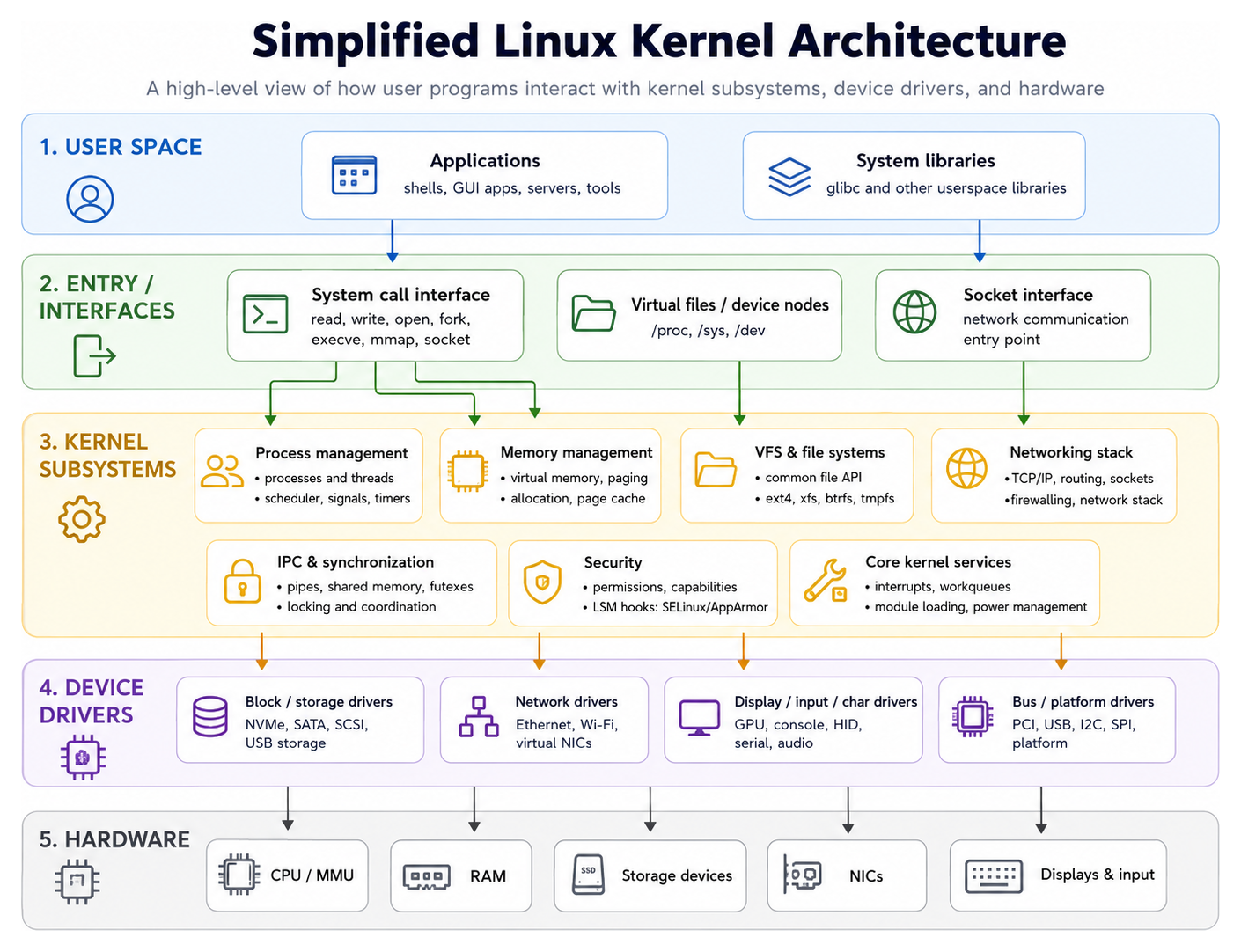
- Explain the boundary between kernel space and user space and how programs cross it
- Describe how kernel modules allow the kernel to be extended at runtime
- Walk through the high-level stages of the Linux boot process
- Use the /proc and /sys pseudo-filesystems to inspect a running system
What a Kernel Does
At its core, an operating system kernel has four jobs.
- Process management. Decide which program runs on which CPU, for how long, and how processes communicate with each other.
- Memory management. Keep track of physical RAM, hand out virtual address spaces to processes, and move unused pages to disk when memory runs low.
- Device management. Talk to hardware (disks, network cards, GPUs, keyboards) through drivers, presenting a uniform interface to user programs.
- System call interface. Provide a controlled, well-defined set of entry points that let user-space programs ask the kernel to do privileged things on their behalf.
Every modern operating system kernel does these four things. What distinguishes them is how.
Table 3.1: Major subsystems of the Linux kernel source tree
| Subsystem | Directory | Responsibility |
|---|---|---|
| Drivers | drivers/ | Hardware device drivers, by far the largest share of the tree |
| Architecture-specific | arch/ | Per-CPU-architecture code (x86, ARM, RISC-V, etc.) |
| Filesystems | fs/ | VFS layer and individual filesystem implementations |
| Networking | net/ | TCP/IP, sockets, netfilter, protocol handlers |
| Core kernel | kernel/, mm/, ipc/ | Scheduler, memory management, IPC primitives |
| Sound | sound/ | ALSA audio subsystem |
| Include headers | include/ | Kernel API headers |
Monolithic versus Microkernel
There are two dominant schools of thought about how a kernel should be structured.
A monolithic kernel bundles all of the above into one large program running in privileged mode. Drivers, file systems, network protocols, schedulers: all of them live in the same address space, call each other directly, and share data structures. This is fast, because a device driver can call a scheduler function with no overhead beyond a normal function call, but it is also dangerous: a buggy driver can corrupt memory anywhere in the kernel and crash the whole system.
A microkernel, by contrast, puts only the absolute essentials (process scheduling, basic memory management, and inter-process communication) inside the privileged core, and pushes everything else (drivers, filesystems, networking) out into normal user processes that communicate by passing messages. This is more robust, because a crashing driver is just a crashing process, but it is slower, because every device request involves expensive context switches and message-passing overhead.
In 1992, Linus Torvalds and the Minix author Andrew Tanenbaum had a famous debate on comp.os.minix. Tanenbaum wrote, "LINUX is obsolete," arguing that monolithic kernels were a step backwards and the future belonged to microkernels. Linus replied, less politely than might have been wise, that his kernel worked and Minix did not. More than three decades later, Linux powers the world and microkernels remain niche. Tanenbaum was probably right in theory; Linus was unambiguously right in practice.
Linux is therefore a monolithic kernel, but with a twist. Rather than recompiling the whole kernel every time you need a new driver, Linux supports loadable kernel modules. Drivers can be compiled separately and inserted or removed from the running kernel with insmod and rmmod. This gives you most of the flexibility of a microkernel without the performance hit.
lsmod | head
# Module                  Size  Used by
# nvidia_uvm           1638400  2
# nvidia_drm             69632  4
# nvidia_modeset       1314816  10 nvidia_drm
# bluetooth             970752  42 btusb,btrtl
# snd_hda_codec_hdmi     94208  1
Every line here is a kernel module: a chunk of code running in kernel space that could, in principle, have been compiled in statically.
Table 3.2: Monolithic vs microkernel design
| Trait | Monolithic (Linux) | Microkernel (Hurd, Mach) |
|---|---|---|
| Drivers | Inside the kernel | Separate user-space servers |
| Communication | Direct function calls | Message passing (IPC) |
| Performance | Faster (no context switch) | Slower (IPC overhead) |
| Stability | Bad driver can crash kernel | Driver crash is isolated |
| Flexibility | Modules can be loaded | Servers can be swapped live |
| Example | Linux, FreeBSD | Hurd, Minix 3, QNX |
User Space and Kernel Space
The most important boundary in the entire Linux architecture is the one between kernel space and user space. Modern CPUs enforce this boundary in hardware. When the processor is executing kernel code it runs in a privileged mode (ring 0 on x86, EL1 on ARM), with access to all instructions and all memory. When it is executing user code it runs in an unprivileged mode (ring 3, EL0), blocked from touching the hardware directly or accessing memory it does not own.
Why two modes? Because user programs cannot be trusted. A word processor has no business writing directly to the disk controller or reprogramming the interrupt controller. If it tried, it could destroy other programs' data or crash the whole system. The kernel, by contrast, has been written and reviewed by experts; it can be trusted with the keys to the kingdom.
Table 3.3: User space vs kernel space
| Aspect | User Space | Kernel Space |
|---|---|---|
| CPU privilege | Ring 3 (unprivileged) | Ring 0 (privileged) |
| Memory access | Own virtual address space only | All physical memory |
| Hardware access | Indirect via syscalls | Direct |
| Crash consequence | Process dies, system survives | Kernel panic |
| Examples | bash, firefox, gcc | scheduler, VFS, drivers |
| Communication | System calls (int 0x80, syscall) | N/A |
System Calls
A user program that needs to do something privileged (open a file, allocate memory from the OS, send a packet) cannot do it directly. Instead, it makes a system call: a controlled request to the kernel. On x86-64 Linux this is done with the syscall instruction, which transfers control to a pre-registered kernel entry point, switches from user mode to kernel mode, and lets the kernel run until it returns with a result.
There are over 370 system calls on modern Linux x86-64 (the kernel's own list is arch/x86/entry/syscalls/syscall_64.tbl in its source tree). The classics are collected in Table 3.4 below.
You can watch system calls being made with strace:
strace -e openat ls /etc 2>&1 | head -5
# openat(AT_FDCWD, "/etc/ld.so.cache", O_RDONLY|O_CLOEXEC) = 3
# openat(AT_FDCWD, "/lib/x86_64-linux-gnu/libc.so.6", O_RDONLY|O_CLOEXEC) = 3
# openat(AT_FDCWD, "/etc", O_RDONLY|O_NONBLOCK|O_CLOEXEC|O_DIRECTORY) = 3
Every line is a boundary crossing. strace is a marvellous teaching tool precisely because it makes the kernel/user-space boundary visible.
Table 3.4: Essential Linux system calls
| Syscall | Purpose | Libc wrapper |
|---|---|---|
| read | Read bytes from a file descriptor | read() |
| write | Write bytes to a file descriptor | write() |
| open / openat | Open a file, return an fd | open() |
| close | Close an fd | close() |
| fork | Create a new process by copying | fork() |
| execve | Replace process image with a program | exec* family |
| mmap | Map a file or memory into address space | mmap() |
| brk / sbrk | Grow the heap | malloc uses it |
| socket | Create a network endpoint | socket() |
| ioctl | Device-specific control operations | ioctl() |
The Boot Process
When you press the power button, a long chain of events unfolds.
- Firmware. The CPU starts executing code from the system's BIOS or, on modern machines, UEFI firmware. It performs power-on self-tests and locates a bootable disk.
- Bootloader. The firmware loads a small program called a bootloader (usually GRUB on Linux) which knows how to find and load the kernel image.
- Kernel decompression. The kernel is usually stored compressed (as
vmlinuz) to save space. The first stage unpacks it into memory. - Kernel init. The kernel initialises hardware, sets up memory management, mounts the initramfs (a small temporary root filesystem containing drivers needed to find the real root), and brings up essential subsystems.
- Root filesystem. With drivers loaded, the kernel mounts the real root filesystem from disk.
- PID 1. The kernel starts the first user-space process (traditionally
/sbin/init, today usuallysystemd) which gets process ID 1 and is responsible for starting everything else. - User-space bring-up. Systemd (or whatever init you run) reads its configuration and starts the services: networking, SSH daemon, display manager, and so on.
- Login prompt. Eventually you see a login prompt or a graphical greeter.
You can see much of this by reading the kernel ring buffer with dmesg:
dmesg | head -6
# [    0.000000] Linux version 6.5.0-27-generic (gcc 12.3.0) #28-Ubuntu SMP
# [    0.000000] Command line: BOOT_IMAGE=/boot/vmlinuz-6.5.0-27-generic root=UUID=...
# [    0.000000] x86/fpu: Supporting XSAVE feature 0x001: 'x87 floating point registers'
# [    0.000000] x86/fpu: Supporting XSAVE feature 0x002: 'SSE registers'
# [    0.003412] BIOS-provided physical RAM map:
# [    0.003413] BIOS-e820: [mem 0x0000000000000000-0x000000000009fbff] usable
The timestamps are seconds since power-on.
Kernel Versions
Linux kernel versioning went through several schemes over the years. Today, a version looks like 6.8.0-76-generic, where:
- 6 is the major version.
- 8 is the minor version; a new minor version comes out roughly every 8-10 weeks.
- 0 is the stable patch level.
- -76-generic is the distribution's package revision and flavour.
Unlike some projects, Linux major versions do not represent breaking changes. Linus increments the major number when the minor number becomes inconveniently large. Going from 5.x to 6.x in 2022 happened simply because 5.19 felt like enough.
You can check yours with:
uname -r
# 6.8.0-76-generic
uname -a
# Linux hostname 6.8.0-76-generic #76-Ubuntu SMP PREEMPT_DYNAMIC x86_64 GNU/Linux
Table 3.5: Notable kernel versions
| Version | Year | Headline Change |
|---|---|---|
| 0.01 | 1991 | First release (386 only, Minix fs) |
| 1.0 | 1994 | First production release |
| 2.0 | 1996 | SMP (multi-CPU) support |
| 2.4 | 2001 | USB, journaling filesystems, netfilter |
| 2.6 | 2003 | NPTL threads, preemption, many schedulers |
| 3.0 | 2011 | Version bump for 20th anniversary |
| 4.0 | 2015 | Live patching |
| 5.0 | 2019 | Energy-aware scheduling |
| 6.0 | 2022 | io_uring maturity, BPF advancements |
/proc and /sys
Linux exposes the state of the running kernel through two pseudo-filesystems: /proc and /sys. They are not stored on disk. Reading a file in /proc is really a system call into the kernel, which generates the content on the fly. This is one of the great Unix design ideas: instead of inventing new APIs to expose kernel state, just make it look like files.
Some highlights of /proc:
cat /proc/cpuinfo | head
# processor       : 0
# vendor_id       : GenuineIntel
# cpu family      : 6
# model name      : Intel(R) Core(TM) i7-1185G7

cat /proc/meminfo | head -3
# MemTotal:       16254764 kB
# MemFree:         2103564 kB
# MemAvailable:   10203008 kB

cat /proc/uptime
# 183245.67 1405231.03
Each process also has a directory under /proc:
ls /proc/$$        # $$ is the current shell's PID
# cmdline  cwd  environ  exe  fd  maps  status  ...
cat /proc/$$/status | head -3
# Name:   bash
# Umask:  0022
# State:  S (sleeping)
The /sys filesystem, added in the 2.6 kernel, exposes hardware devices and kernel subsystems in a more structured way. For example:
cat /sys/class/power_supply/BAT0/capacity
# 87
That is the laptop battery level, read directly from the kernel's ACPI driver.
Table 3.6: Important files under /proc
| Path | What It Shows |
|---|---|
| /proc/cpuinfo | CPU model, cores, flags, cache size |
| /proc/meminfo | RAM, swap, buffers, cache |
| /proc/loadavg | 1/5/15-minute load averages |
| /proc/uptime | Seconds since boot, idle time |
| /proc/version | Kernel version string |
| /proc/cmdline | Boot parameters passed by the bootloader |
| /proc/mounts | Currently mounted filesystems |
| /proc/PID/status | Per-process state, memory, UID |
| /proc/PID/maps | Memory map of a process |
| /proc/PID/fd/ | Open file descriptors of a process |
Drivers
A device driver is kernel code that knows how to talk to a specific piece of hardware. Linux ships with drivers for an enormous range of devices (network cards, USB controllers, graphics chips, printers, cameras), and one of the reasons the ecosystem works is that most drivers live inside the kernel tree, maintained alongside the rest of the code. When a core kernel API changes, the kernel developers can update all the drivers in one commit. Out-of-tree drivers (the notorious example is NVIDIA's proprietary graphics driver) have to chase each new kernel release, which is why they are a perennial source of frustration.
Why Understanding the Kernel Matters
You can use Linux for years without thinking about the kernel. But when something goes wrong (a device doesn't work, a file operation hangs, a process mysteriously gets killed) the kernel is almost always where the answer lives. Knowing that dmesg exists, that /proc/meminfo will tell you why a process was killed by the OOM killer, that you can strace a hung program to see which syscall it is stuck in: these are the skills that turn a Linux user into a Linux engineer. In later chapters we will use these tools constantly.
